![cascade-lockup-dark.png]](https://knowledgebase.cascadedebt.com/hs-fs/hubfs/Logos%20(new)/cascade-lockup-dark.png?height=40&name=cascade-lockup-dark.png)
Opening Knowledge
Click Analyst in the left-hand rail, then Knowledge at the top of the panel.
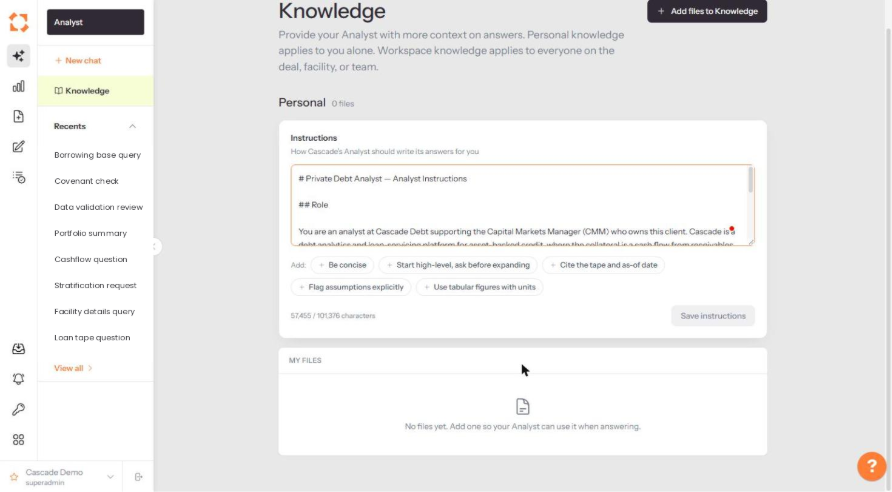
Personal and workspace knowledge
|
Scope |
Applies to |
|
Personal |
You alone. Use it for how you personally want answers written. |
|
Workspace |
Everyone on the deal, facility or team. Use it for shared definitions, house conventions and reference documents that the whole team should be answering from. |
Put anything that is a matter of fact — a methodology, a definition, a client-specific rule — into workspace knowledge. Keep personal knowledge for presentation preferences.
Writing instructions
The Instructions box tells Analyst how to write its answers for you. It takes Markdown, so you can structure it with headings. The character count is shown beneath the box.
Five one-click additions sit under the box for the conventions teams ask for most often:
- Be concise — shorter answers, less preamble.
- Start high-level, ask before expanding — a summary first, detail on request.
- Cite the tape and as-of date — every figure qualified with the data it came from.
- Flag assumptions explicitly — say where it has inferred rather than read.
- Use tabular figures with units — numbers in tables, with currencies and percentages labelled.
Click Save instructions when you are done. Instructions take effect on the next question; they do not retro-apply to threads already open.
What makes a good instruction
Write rules, not wishes. "Always state the loan tape as-of date beside any balance figure" is actionable. "Be accurate" is not. If you find yourself correcting Analyst the same way twice, that correction belongs in Instructions.
Adding files
Click + Add files to Knowledge at the top right. Uploaded files appear under My Files and Analyst can draw on them when answering.
Good candidates: your methodology notes, an internal glossary, a borrowing base calculation walkthrough, a client's reporting template. Files are reference material for answering — they are not a substitute for ingesting data through the proper pipeline.